ebo-ok has three writing models and two cover models. This page sums up which kind of book each one suits and how to use it, with sample covers drawn from the same brief so you can compare.
Writing models
Used to draft tables of contents, chapters and sections. All three write Thai; they differ in how carefully they write, how long a chapter they can write, and what they cost in credits.
Fast and economical
Ebo Lite
The entry model: the fewest credits and quick turnaround. Suits straightforward content and chapters that are not too long.
Good for
How-to guides and step-by-step knowledge books
First drafts, trying out ideas, or outlining a table of contents
Short books whose chapters stay at medium length
Longest chapter
Medium
Medium chapter
3 credits
Balanced quality and price
Ebo Pro
Builds an argument step by step more reliably, reads more fluently, and can write long chapters. Works for most books.
Good for
Business, finance and self-improvement books
Non-fiction you plan to sell
Picture books and children’s books that should be fun to read
Longest chapter
Long
Medium chapter
8 credits
Most thorough
Ebo Max
For writing that needs the most depth and continuity. No cap on chapter length, and the most credits per job.
Good for
Novels and short stories that must keep characters and tone consistent
Textbooks, academic writing and specialist topics
Very long chapters, or books where the AI decides the length
A suggested starting point for each kind of book. You can switch models at every step — start with the suggestion and adjust to what you get.
Which model for which book
Book type
Writing model
Cover model
First draft / trying ideasSave credits while the structure is still moving
Ebo Lite
E-cover 3 Flash
How-to / general knowledgeStraightforward content, explained step by step
Ebo Lite or Ebo Pro
E-cover 3 Flash
Business, finance, self-improvementThe reasoning has to hold up
Ebo Pro
E-cover 3 Flash or E-cover 3 Pro
Picture book / children’s bookFun language and a detailed illustrated cover
Ebo Pro
E-cover 3 Pro
Novel / short storiesCharacters and tone must hold for the whole book
Ebo Max
E-cover 3 Pro
Textbook / academicNeeds depth and long chapters
Ebo Max
E-cover 3 Flash
How to use them
1
Choose a default when you create the book
It is used for every step of that book — the table of contents, chapters and sections.
2
Switch models at any step
For example, draft the table of contents with one model and write the key chapters with another. Each step is charged at the model it used.
3
Chapter length depends on the model
Models write to different lengths. A length a model cannot write is not selectable — switch to a higher model first.
4
Regenerate if it isn’t right
A regeneration is a new job and uses credits at the selected model’s rate. Say clearly what you want changed before you run it again.
Credit-saving tip: outline and draft the table of contents with Ebo Lite, then write the real content with Ebo Pro or Ebo Max once the structure is settled.
Cover models (E-cover)
Draws a book cover, with the title in Thai, from your book’s details. The cover model is chosen separately from the writing model, and every run gives you 3 covers to choose from.
Fast, economical covers
E-cover 3 Flash
Tidy, readable layouts with fewer elements — good for trying several directions before settling on one.
Good for
Guides, textbooks and knowledge books that want a clean cover
Trying several styles to find a direction
Books that want a simple overall look
10 credits / run
More detail
E-cover 3 Pro
Sharper images and lettering, and usually more design elements and detail — for covers where the artwork has to stand out.
Good for
Novels, picture books and books where the cover sells
Long titles, or covers that need crisp lettering
Books ready to go on sale
20 credits / run
How to make a cover
Open your book and go to the cover step
Pick a cover style, or let the system choose one from your content
Choose an E-cover model, and optionally type what else you want
Pick your favourite of the 3 covers — or run it again if none is right
Already have a cover?
Upload your own cover file in the same step — it uses no credits.
Compare covers: same brief, different model
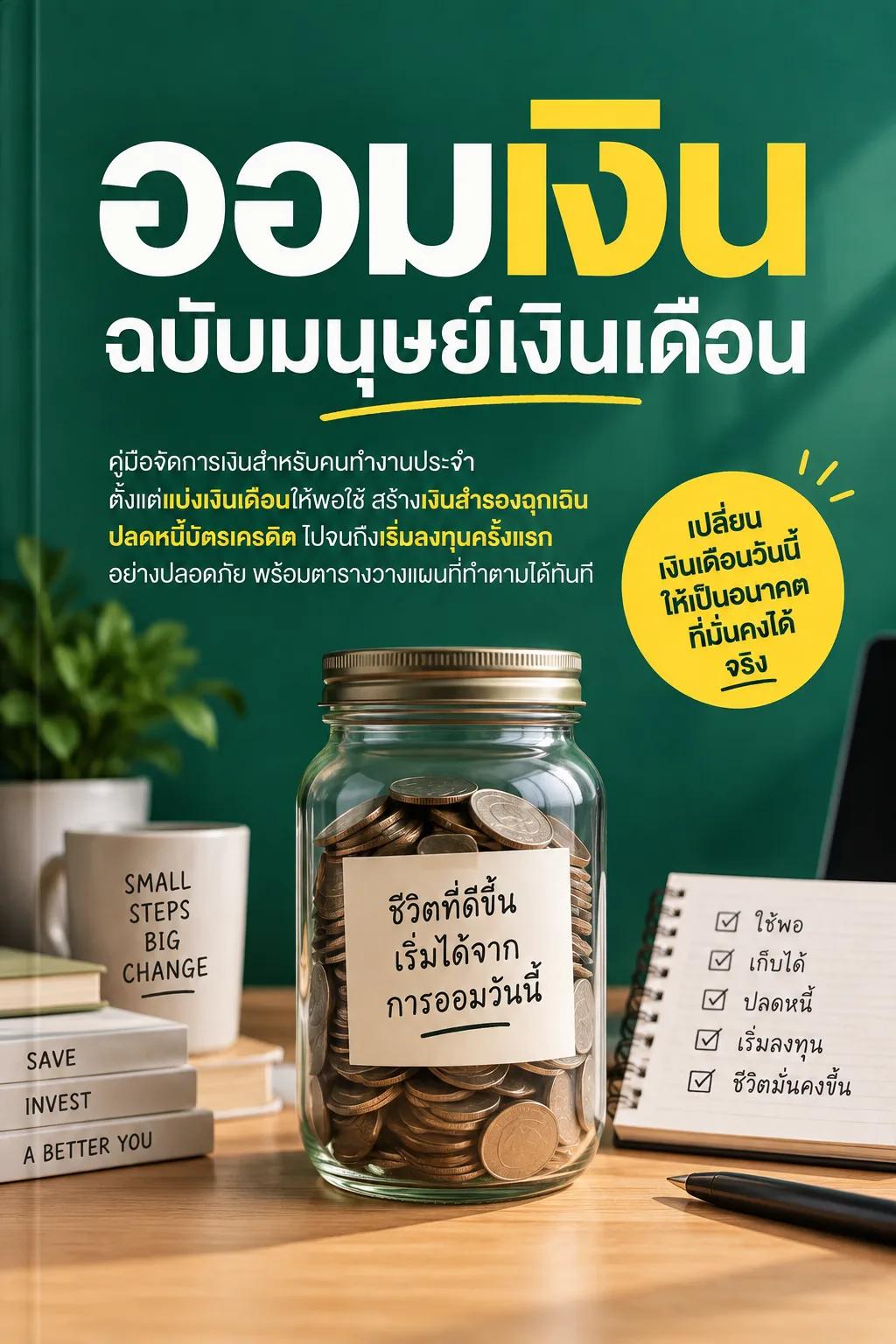
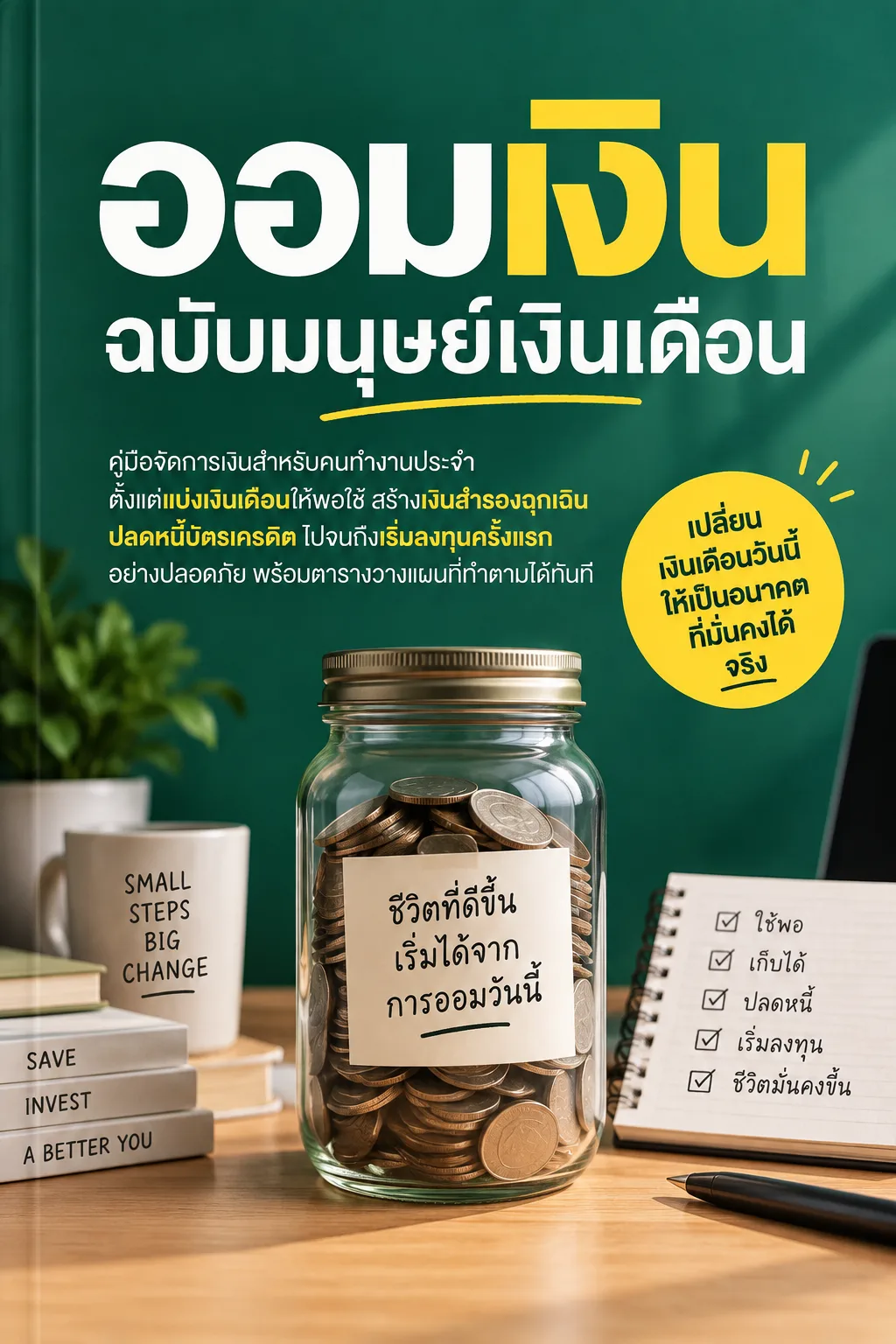
These covers were drawn by ebo-ok’s real cover system from exactly the same title, description and style — only the model differs (E-cover 3 Flash vs E-cover 3 Pro). Click a cover to see it full size.
Money guide
ออมเงินฉบับมนุษย์เงินเดือน
A money guide for salaried workers: splitting a salary, building an emergency fund, clearing credit-card debt and making a first investment.
Cover style: How-to guide
Both models spelled the title correctly. Pro added a blurb sticker, a label on the coin jar and a checklist; Flash kept a cleaner layout.
A woman returns to her riverside hometown after her mother’s death and finds old letters that reveal a family secret, in a rainy season that will not end.
Cover style: Literary
Both carry the quiet, muted mood of the literary style. Pro stages the scene with more depth and more detail in the room.
Sample covers drawn in September 2026. Yours will not match these exactly — the AI draws something new every time, and the models may have been updated since.
ebodio — AI narration
ebodio turns your book into natural-sounding Thai narration with AI. Listen right inside the reader — every book uses the same consistent voice.
A natural Thai voice that reads accurately
In our tests, transcribing the narration back into text gave under 1% errors. Numbers and units come out right too — “8–12 Hz” is read in Thai as “eight to twelve hertz”.
Listen to a sample
AI-generated voice
Tables that make sense when heard, the author’s own words
Tables are told as sentences, one row at a time, and illustrations are read from their captions. Everything else is read exactly as the author wrote it — nothing added or reworded.
Highlights and scrolls along
The paragraph being read is highlighted and the page scrolls with it (you can turn this off). Tap any paragraph to start listening from there.
Keeps playing with the screen off
Control playback from the lock screen, change the speed from 0.75× to 2× without distorting the voice, move on to the next chapter automatically, and pick up where you left off.
Starts in seconds
No waiting for the whole book — the audio is prepared one chapter at a time.
Pay once per book
Paid in credits, priced by the book’s length, and you always see the price before you confirm. If you bought the book, you can always listen to the version you bought.
For your own books too
Owners can turn it on — even for a book written just for themselves and never published. After editing, update the audio and pay only for the parts that need new audio.
ebodio vs the browser voice
The reader also offers a free voice from your browser. Pick the voice you like and switch any time.
ebodio vs the browser voice
Browser voice
ebodio
Cost
Free
Pay once per book
Voice
Depends on your device. Some have no Thai voice, or read Thai as English letters
A natural Thai voice, the same on every device
Screen off / other apps
Stops on most phones
Keeps playing, with lock-screen controls
Tables
Cells read one after another
Told as sentences, one row at a time
How to start listening
Open a book in the reader
Tap the headphones button
Choose ebodio ✦, then turn it on
Good to know
It’s an AI-generated voice
Some names may be mispronounced
ebodio highlights one paragraph at a time, not word by word
Offline listening isn’t available yet
Very long books may not be able to use ebodio yet
Frequently
asked
Can one book use several models?
Yes. The model chosen when you create the book is only the default — you can switch at each step, and the cover model is chosen separately from the writing model.
Why is every result different?
The AI generates something new every time, so even the same brief and model give somewhat different results. If it isn’t right, describe what you want more precisely and run it again.
Will the models change or improve?
We keep improving the models behind each tier. The names may stay the same while their abilities improve with updates. Current credit prices are always on the pricing page.
The Thai lettering on my cover is wrong — what can I do?
The AI sometimes draws Thai letters, vowels or tone marks incompletely. Run it again, switch to E-cover Pro, which usually letters more crisply, or upload your own cover.
How long can I listen after paying for ebodio?
You pay once per book. If you bought the book, you can always listen to the version you bought. If it’s your own book and you edit it, you can update the audio and pay only for the parts that need new audio.
Can I listen without spending credits?
Yes. The reader has a free browser voice, but how it sounds depends on your device — some have no Thai voice, and most phones stop reading when the screen turns off. For a natural Thai voice that keeps playing with the screen off, choose ebodio.
Ready to start writing?
Pick the model that fits your book and start creating.